When you use DISTINCT in a Select statement, you are saying that you only want one row in the result set for each distinct set of values. The result set will not have any two rows that have the same values in every column.
Let's say in table SOP30300, you have the following data:
INV001 Items: ABC, DEF, GHI
INV002 Items: DEF, JKL, MNO
INV003 Items: MNO
Then you run this statement:
SELECT DISTINCT itemnmbr
FROM dbo.SOP30300
The result set should be:
ABC,DEF,GHI,JKL,MNO
Tuesday, July 03, 2007


Monday, July 02, 2007
2007 Microsoft® MVP Award
Got this last night:
"Congratulations! We are pleased to present you with the 2007
Microsoft® MVP Award!

The Microsoft MVP Award is our way of saying thank you and to honor and
support the significant contributions you make to communities
worldwide. As a recipient of Microsoft's™ Most Valuable Professional award,
you join an elite group of technical community leaders from around the
world who foster the free and objective exchange of knowledge by actively
sharing your real world expertise with users and Microsoft.  Microsoft
salutes all MVPs for promoting the spirit of community and enhancing
peoples lives and the industrys success everyday."

Thank you Microsoft for believing in my capability and rest assure that I’ll be extending my
hands more to the community this year.
Wednesday, April 25, 2007
How to setup your role in Great Plains 9.0
The first time that you log in to Microsoft Dynamics GP 9.0, you can select to have default information that is specific to your job displayed on your home page. When you select a user role that is similar to your job responsibilities, the information that is displayed on your home page will be set up for you to use right away. Reminders, Reports, SmartList favorites, and Metrics that you might use daily will be displayed on your home page, and default settings for each of the five areas of your home page will be applied. Click the Customize this page link to open the Customize Home Page window.
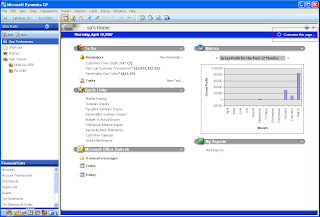
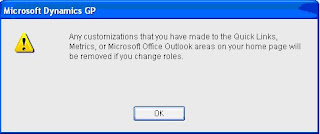

Once the Customize Home Page window is open click on the Change Role button.


Select an industry and a role that best describes the work that you do so that information specific to your job will be displayed on your home page. For each role, there are unique default settings for the content areas on your home page. For example, if you select the Accounting Manager role, reminders for recurring General Ledger batches will be displayed in the To Do area of your home page, and you will have quick links set up for windows that you would use frequently, such as the Master Posting window, Summary Inquiry window, and the Checkbook Balance Inquiry window. Look on the left-side of the Select Home Page window to get some information on the tasks for the role you’ve chosen. Click OK once you’ve selected your role.

Wednesday, January 17, 2007
2007 Predictions
| My Crystal Ball Says | ||
|---|---|---|
| Less Time Spent On | More Time Spent On | |
| SARBOX | XBRL | |
| Storage Area Network (SAN) | Blade Servers | |
| Researching Service Oriented Architecture (SOA) | Implementing SOA | |
| Oracle, SAP, Microsoft and others acquisitions | Making it work as planned | |
Thursday, December 28, 2006
User or role already exists in the current database
When you try to give a user access to a database you get the above message. To resolve this you need to have access to SQL Server Enterprise Manager.
Open Enterprise Manager then go to Security>Logins, right-click on the user having this problem then go to Properties. Open the Database Access tab then Unmark or Uncheck the database you're giving the user access to.
Go back to Great Plains then try to give the user access again.
Open Enterprise Manager then go to Security>Logins, right-click on the user having this problem then go to Properties. Open the Database Access tab then Unmark or Uncheck the database you're giving the user access to.
Go back to Great Plains then try to give the user access again.
Tuesday, December 12, 2006
Microsoft Dynamics GP Demos
I've been seeing a lot of questions in forums asking if there are available demos for Microsoft Dynamics GP. Here are links to the demos:
Foundation I
Foundation II
Financial Management Overview
Financial Management I
Financial Management II
Distribution I
Distribution II
Foundation I
Foundation II
Financial Management Overview
Financial Management I
Financial Management II
Distribution I
Distribution II
Tuesday, November 28, 2006
Product Reviews
I’ve been approached by some vendors to give product reviews in this blog. I've also thought of doing this in the past but wanted to concentrate on GP, SQL Server and Crystal. Since the emails have not stopped, I've decided to do it starting 2007.
I'll give product review on one product per month. Please feel free to contact me with your suggestions. I'm only going to review products I'm currently using and had experience in the past. If you want your product reviewed, try to contact me as well.
I'll give product review on one product per month. Please feel free to contact me with your suggestions. I'm only going to review products I'm currently using and had experience in the past. If you want your product reviewed, try to contact me as well.
Subscribe to:
Posts (Atom)
Digital Transformation unleashed
You're the CIO/CDO sitting in your weekly update executive meeting with the CEO, CFO, COO, and others. You start the meeting with the pr...

-
 The first time that you log in to Microsoft Dynamics GP 9.0, you can select to have default information that is specific to your job display...
-
I've seen this error on a few environment I've worked with and is still seeing it in a couple of forums. Below is a link and the inf...
-
SAP Fiori is using modern design principles like role-based, responsive, simple and delightful to create the next generation of SAP software...