What is Revenue and Expense Deferral (RED)?
Revenue Deferral is considered a liability until it becomes relevant to the business at hand, such as a payment received for work that has not yet been performed. opposite of deferred charge. Expense Deferral refers to an item that will initially be recorded as an asset but is expected to become an expense over time and/or through the normal operation of the business.
Who can use this module?
Dynamics GP RED (Revenue and Expense Deferral) was designed for any company that needs to defer revenue or expense.
Let's say you're a media company with business in magazine publishing. You're offering your magazine subscription on a yearly, semi-annually or monthly (one-time) basis. When somebody subscribes to your magazine and pay a year subscription, you'll need to defer part of this subscription. At the end of the subscription period, you will have fulfilled your responsibility and the subscription will be fully realized as earned income.
How do I book a deferred entry from a Sales Invoice in Dynamics GP?
Once you have the sales invoice created, open the Distribution window select the account you want to defer then go to Extras>Additional>Deferral. Enter your Start and End dates, billing recognition account and choose your deferral method (Days Period, Equal Period and Miscellaneous).
Things to note when using this module:
- Deferred entries are always valued at functional currency
- You can only defer one invoice at a time
- Void Deferral Transactions can be utilize to void deferred entries only and have the original document like a Sales Invoice unvoided
There's room for improvement with this module including:
- Mass document deferral
- Audit-trail from a GL entry
- Multi-currency reporting based on originating document currency
To learn more about Revenue and Expense Deferral, you can visit RevenueRecognition.com
Showing posts with label Dynamics GP Application. Show all posts
Showing posts with label Dynamics GP Application. Show all posts
Tuesday, November 10, 2009


Tuesday, November 11, 2008
Microsoft Dynamics GP/SL HR/Payroll Offer
For Microsoft Dynamics GP customers licensed under Module Based Licensing Professional Edition or Business Ready Licensing: Receive up to 20% off on Human Resources and Payroll modules purchases over $5,000
For Microsoft Dynamics GP customers licensed under Module Based Licensing Standard Edition and Microsoft Dynamics SL customers licensed under Module Based Licensing or Business Ready Licensing: Receive up to 20% off on Human Resources and Payroll modules purchases over $3,000*
As an additional benefit, Microsoft Dynamics GP customers licensed under Module Based Licensing or Business Ready Licensing can receive up to a 20% discount on a PTO manager module purchase
Click HERE for more information
For Microsoft Dynamics GP customers licensed under Module Based Licensing Standard Edition and Microsoft Dynamics SL customers licensed under Module Based Licensing or Business Ready Licensing: Receive up to 20% off on Human Resources and Payroll modules purchases over $3,000*
As an additional benefit, Microsoft Dynamics GP customers licensed under Module Based Licensing or Business Ready Licensing can receive up to a 20% discount on a PTO manager module purchase
Click HERE for more information
Friday, August 01, 2008
Error when using ProTools Item Combiner
Question: I am merging one item code to another. The item validates. I run the merge
and get an error "Cannot insert duplicate key row in object 'IV10201' with
unique index 'AK3IV10201'."
If it's merging one code into another table, how could it possibly have key
violation since it's changing the code?
The same error is happening on every item I try.
Answer(from my friend Richard Whaley):
This is one of the headaches of combining items.
The IV10201 table is the purchase receipts. So, if Item A had a receipt and
Item B had a receipt, you are also combining the receipt list. This should
work EXCEPT...
The AK3IV10201 index is a unique index, meaning there can only be ONE entry
in the index with the same item number, receipt number, and receipt type.
So, if item A had a receipt #5 via PO and item B had are receipt #5 via PO,
you get this error.
How to fix it? you need to purge receiving history, something you might not
want to do.
and get an error "Cannot insert duplicate key row in object 'IV10201' with
unique index 'AK3IV10201'."
If it's merging one code into another table, how could it possibly have key
violation since it's changing the code?
The same error is happening on every item I try.
Answer(from my friend Richard Whaley):
This is one of the headaches of combining items.
The IV10201 table is the purchase receipts. So, if Item A had a receipt and
Item B had a receipt, you are also combining the receipt list. This should
work EXCEPT...
The AK3IV10201 index is a unique index, meaning there can only be ONE entry
in the index with the same item number, receipt number, and receipt type.
So, if item A had a receipt #5 via PO and item B had are receipt #5 via PO,
you get this error.
How to fix it? you need to purge receiving history, something you might not
want to do.
Wednesday, February 13, 2008
Creating or opening a Note in Collection Management
We just moved all our servers to a new CoLo and part of this exercise was moving our SQL Server and shared files to a new VM server. After configuring the new server I had to update all GP Client's Dynamics.set to point to this server as it host some of our dictionaries.
Everything was working except certain users who try to create or open a Note in Collection Main and would hanged for 3-5 minutes. So I looked at their set files even restarted the server and nothing seems to work.
Finally, I created a new user and created a new Note. The system requested for an OLE Notes path and this will be save to Dex.ini. I went to the users who were having the issues and checked their OLEPATH in Dex.ini and surely it was pointing to a folder in our old server.
Just a note to all GP admins, I recommend having a dedicated server for this otherwise you can point it local: OLEPATH = C:\folder\.
Also, UNC Pathnames are not recognized as a valid path for OLE Notes.
Everything was working except certain users who try to create or open a Note in Collection Main and would hanged for 3-5 minutes. So I looked at their set files even restarted the server and nothing seems to work.
Finally, I created a new user and created a new Note. The system requested for an OLE Notes path and this will be save to Dex.ini. I went to the users who were having the issues and checked their OLEPATH in Dex.ini and surely it was pointing to a folder in our old server.
Just a note to all GP admins, I recommend having a dedicated server for this otherwise you can point it local: OLEPATH = C:\folder\.
Also, UNC Pathnames are not recognized as a valid path for OLE Notes.
Wednesday, April 25, 2007
How to setup your role in Great Plains 9.0
The first time that you log in to Microsoft Dynamics GP 9.0, you can select to have default information that is specific to your job displayed on your home page. When you select a user role that is similar to your job responsibilities, the information that is displayed on your home page will be set up for you to use right away. Reminders, Reports, SmartList favorites, and Metrics that you might use daily will be displayed on your home page, and default settings for each of the five areas of your home page will be applied. Click the Customize this page link to open the Customize Home Page window.
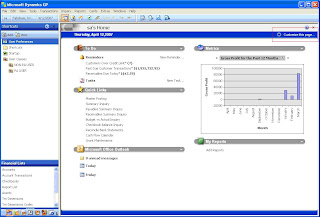
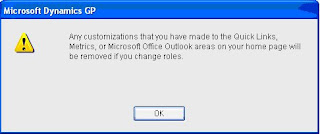

Once the Customize Home Page window is open click on the Change Role button.


Select an industry and a role that best describes the work that you do so that information specific to your job will be displayed on your home page. For each role, there are unique default settings for the content areas on your home page. For example, if you select the Accounting Manager role, reminders for recurring General Ledger batches will be displayed in the To Do area of your home page, and you will have quick links set up for windows that you would use frequently, such as the Master Posting window, Summary Inquiry window, and the Checkbook Balance Inquiry window. Look on the left-side of the Select Home Page window to get some information on the tasks for the role you’ve chosen. Click OK once you’ve selected your role.

Monday, February 06, 2006
GP Product Report III
PROBLEM REPORT:
The bug ID or problem report number is 18409. Title is 'The payment number is not reserved in Receivables Management' message. This applies to all versions of Great Plains eEnterprise including 9.0.
COMMENTS:
When you create a sales invoice from an order with Credit Card, Check or Cash payment and try to post the document, you'll receive an error in the sales edit list - 'The payment number is not reserved in Receivables Management'.
MBS would send you a fix by deleting & recreating RM00401 but it only worked once in my case. The solution would be to:
1) Remove the sales payment on the invoice then Save
2) Enter the same sales payment on the invoice then Save
3) Delete the General Ledger entries because when the sales payment was entered the first time the entries were also posted. If you post the sales payment distribution entries, this would create a duplicate entry
NOTE: If you're trying to remove a sales payment on a previous year, make sure you open the Financial & Sales module on that month/year.
The bug ID or problem report number is 18409. Title is 'The payment number is not reserved in Receivables Management' message. This applies to all versions of Great Plains eEnterprise including 9.0.
COMMENTS:
When you create a sales invoice from an order with Credit Card, Check or Cash payment and try to post the document, you'll receive an error in the sales edit list - 'The payment number is not reserved in Receivables Management'.
MBS would send you a fix by deleting & recreating RM00401 but it only worked once in my case. The solution would be to:
1) Remove the sales payment on the invoice then Save
2) Enter the same sales payment on the invoice then Save
3) Delete the General Ledger entries because when the sales payment was entered the first time the entries were also posted. If you post the sales payment distribution entries, this would create a duplicate entry
NOTE: If you're trying to remove a sales payment on a previous year, make sure you open the Financial & Sales module on that month/year.
Tuesday, November 08, 2005
Great Plains ver7.5 Bug Report II
Let me rephrase the title because GP don't use bug, instead I'll use Great Plains ver7.5 Product Report II.
In Smartlist, sometimes a user can accidentally open an object by mistake. In this case instead of using Receivables Transactions, he/she opens Receiving Transactions. If this happen, you'll get this message:
FP: Null Field Address Form: - XX Wind:XXX Fld:XXXX
When you close the message, the Unhandled script exception error opens. Now you can't get out of the error mesaage and you're stuck. The next thing the user needs to do is contact the Great Plains administrator to clear your userid in the database or use User Activity to delete your session.
I've reported this to GP and the PR code is 42126 which they said doesn't appear that it's slated to be addressed in the coming releases.
If you experience the same error on other objects, please go to CustomerSource and report the incident. The more PR code created of the same nature, will move the PR priority even though this isn't a critical error to resolve in the first place.
In Smartlist, sometimes a user can accidentally open an object by mistake. In this case instead of using Receivables Transactions, he/she opens Receiving Transactions. If this happen, you'll get this message:
FP: Null Field Address Form: - XX Wind:XXX Fld:XXXX
When you close the message, the Unhandled script exception error opens. Now you can't get out of the error mesaage and you're stuck. The next thing the user needs to do is contact the Great Plains administrator to clear your userid in the database or use User Activity to delete your session.
I've reported this to GP and the PR code is 42126 which they said doesn't appear that it's slated to be addressed in the coming releases.
If you experience the same error on other objects, please go to CustomerSource and report the incident. The more PR code created of the same nature, will move the PR priority even though this isn't a critical error to resolve in the first place.
Subscribe to:
Posts (Atom)
Digital Transformation unleashed
You're the CIO/CDO sitting in your weekly update executive meeting with the CEO, CFO, COO, and others. You start the meeting with the pr...

-
 The first time that you log in to Microsoft Dynamics GP 9.0, you can select to have default information that is specific to your job display...
 -
I've seen this error on a few environment I've worked with and is still seeing it in a couple of forums. Below is a link and the inf...
-
SAP Fiori is using modern design principles like role-based, responsive, simple and delightful to create the next generation of SAP software...